DESKTOP PLAYER
A small TAE TRAX player that floats on top of your other windows. Every song on TAE TRAX, your playlists, and offline listening, while you work.
⬇ DOWNLOAD FREE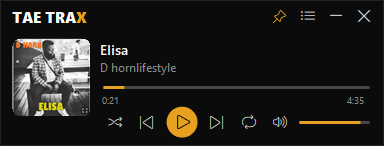
Drag it anywhere. It stays above your other windows, or hide it in the tray and the music keeps going.
Sign in and your TAE TRAX playlists are there. Add songs from the player and they show on the website too.
Download songs to play without internet. Downloads are locked to the player and can't be copied or shared.
Every 30 seconds you listen counts as a stream for the artist, even offline.
The player checks TAE TRAX every few minutes and tells you when new songs drop.
When a new version is out, the player tells you and updates itself in a few seconds.
Your keyboard's play, pause, next and previous keys work, even when the player is hidden.
HOW TO START
- Download the zip and unzip it (right-click → Extract all).
- Double-click TAE TRAX Player. If Windows says "Windows protected your PC", click More info → Run anyway.
- Click the list button to see every song. Double-click one to play.
- Sign in with your TAE TRAX account to get your playlists and downloads. No account? Join free.
QUESTIONS
Is the TAE TRAX desktop player free?
Yes. The player is free, and every song on TAE TRAX plays free in it, the same as on the website.
Which computers does it work on?
Windows 10 and Windows 11. There is nothing to install: unzip it and double-click "TAE TRAX Player". A Mac version isn't available yet. On an Android phone or iPhone, use the free phone app at tae-trax.online/app.
Why does Windows say "Windows protected your PC"?
Windows shows that for new apps it hasn't seen many times yet. Click "More info", then "Run anyway". You only need to do this once.
Can I listen without internet?
Yes. Sign in, right-click a song and choose "Download for offline". Downloads are locked to the player on your computer: they can't be copied or shared as music files. Go online at least once every 30 days to keep them playing.
Do plays in the desktop player count for the artist?
Yes. Every 30 seconds of listening counts as a stream for the artist, the same as on the website, including songs you play offline (they count the next time you are online).
How do I update the player?
You don't have to do anything. The player checks for a new version when it opens and every few hours. When there is one, it shows an UPDATE button and a notification: click it and the player downloads the update, installs it and opens again in a few seconds. Your music, sign-in and downloads stay. (Players from before version 1.1 can't update themselves: download the new one here once.)
Does it sync with my TAE TRAX account?
Yes. Sign in with your TAE TRAX email and password and your playlists appear. Add a song to a playlist in the player and it's on the website too.